Hiển thị các bài đăng có nhãn CRUD. Hiển thị tất cả bài đăng

Thứ Ba, 1 tháng 2, 2022

NodeJS – Simple CRUD APIs with MySQL

In this article, I will do a simple CRUD APIs in NodeJS, Express and MySQL. We learn how to create restful (create, read, update, delete) api in NodeJS.


API End Points, test on Postman:

  • GET /learns: Give all learns stored in database
  • GET /learns/{id}: Give a specific user with id.
  • POST /learns : Create a record
  • PUT /learns/{id}: Update a record
  • DELETE /learns/{id}: Delete a record


Modules to install and use in this example:

  • express.js: Web framework express.
  • mysql: Node.js driver for MySQL.
  • body-parser: Converting the POST data into the request body.
  • nodemon: Automatically restart the server whenever the code changes.


1. Install the modules to use in NodeJS

Run [npm init] to initialize the source file, package.json. Select the js code file is index.js

npm init

Install these packages, type in the following command on Git Bash or your favorite cmd:

npm i –s express express-handlebars mysql body-parser

Installing nodemon with the global command:

npm i -g nodemon


We will have the following soure:

source-folder-method-get-list-nodejs-simple-crud-apis-with-mysql

Source folder


Package.json file content:

{
“name”: “nodemysql”,
“version”: “1.0.0”,
“description”: “”,
“main”: “index.js”,
“scripts”: {
“test”: “echo \”Error: no test specified\” && exit 1″
},
“author”: “”,
“license”: “ISC”,
“dependencies”: {
“body-parser”: “^1.19.0”,
“express”: “^4.17.1”,
“express-handlebars”: “^5.3.0”,
“mysql”: “^2.18.1”
}
}


2. MySQL Database

Create Database learns, with node_mysql_simple table as simple as follows:

// Schema: learns, DB: node_mysql_simple

CREATE DATABASE `learns` /*DEFAULT CHARACTER SET utf8 */;

CREATE TABLE `node_mysql_simple` (
`id` int(11) NOT NULL AUTO_INCREMENT,
`name` varchar(45) DEFAULT NULL,
`email` varchar(45) DEFAULT NULL,
`course_id` int(11) DEFAULT NULL,
PRIMARY KEY (`id`)
) ENGINE=InnoDB DEFAULT CHARSET=utf8;

database-method-get-list-nodejs-simple-crud-apis-with-mysql

MySQL Database

3. Index.js file server code

Use the required libraries that have been installed in NodeJS and establish a connection with MySQL.

const mysql = require(‘mysql’);
const express = require(‘express’);
const bodyparser = require(‘body-parser’);
var app = express();

// Express server
app.use(bodyparser.json());

// MySQL connection details
var mysqlConnection = mysql.createConnection({
host: ‘localhost’,
user: ‘root’,
password: ”,
database: ‘learns’,
multipleStatements: true
});

mysqlConnection.connect((err) => {
if (!err) {
console.log(‘Connect success.’);
} else {
console.log(‘Connect faile: ‘ + JSON.stringify(err, undefined, 2));
}
});

const port = process.env.PORT || 8080;
app.listen(port, () => console.log(`Listen on port ${port}…`));


Now you run the web server using command: node index.js

node index.js

And your server is running at port 8080.
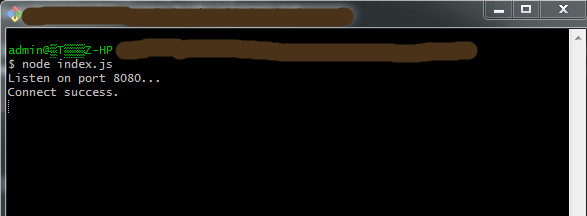
gitbash-command-nodejs-simple-crud-apis-with-mysql

Command run the web server


3.1. Insert data to Database, method POST route

var urlencodedParser = bodyparser.urlencoded({ extended: false });

// Post route value get from params
app.post(‘/learns’, urlencodedParser, (req, res) => {
let name = req.body.name;
let email = req.body.email;
let course_id = req.body.course_id;

let sql = “INSERT INTO node_mysql_simple (name, email, course_id) VALUES (?, ?, ?)”;
mysqlConnection.query(sql, [name, email, course_id], (err, rows, fields) => {
if (!err) {
res.send(‘Inserted ID : ‘ + rows.insertId);
} else {
console.log(err);
}
})
});


– Test on Postman: Input simple data with name, email. course_id.

method-post-method-get-list-nodejs-simple-crud-apis-with-mysql

Method Post


Or you can use MySQL insert multiple rows from array.

// Post route direct value
app.post(‘/learnDirect’, (req, res) => {
// Multi values
let values = [
[‘Amit’, ‘amit@gmail’, 1],
[‘Rishi’, ‘rishi@gmail’, 1],
[‘Akash’, ‘akash@gmail’, 1],
];

let sql = ‘INSERT INTO node_mysql_simple (name, email, course_id) VALUES ?’;
mysqlConnection.query(sql, [values], (err, rows, fields) => {
if (!err) {
res.send(‘Inserted ID ‘ + rows.insertId);
} else {
console.log(‘Error: ‘ + err);
}
});
});

3.2. Show data list and detail data with method GET route

– Get route list:

// Get route list
app.get(‘/learns’, (req, res) => {
mysqlConnection.query(‘SELECT * FROM node_mysql_simple’, (err, rows, field) => {
if (!err) {
res.send(rows);
} else {
console.log(‘Query error: ‘ + err);
}
})
});


After inserting the second record, we have the results, test on Postman:
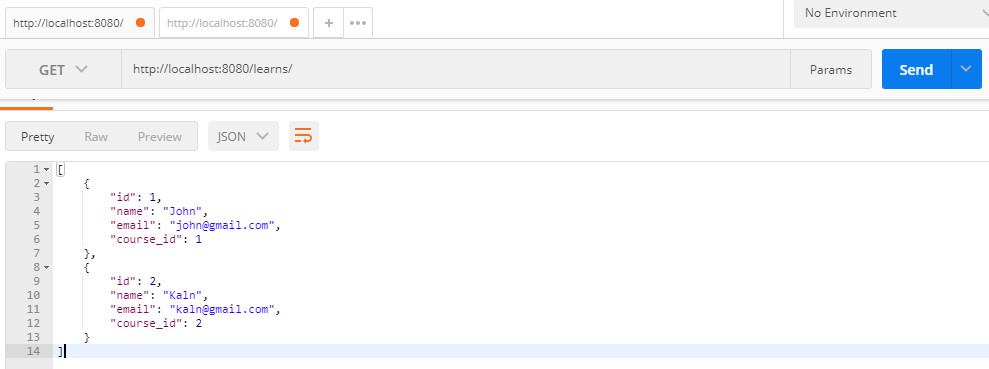
method-get-list-nodejs-simple-crud-apis-with-mysql

Method Get, get data list


– Get route detail:

// Get route detail
app.get(‘/learns/:id’, (req, res) => {
mysqlConnection.query(‘SELECT * FROM node_mysql_simple WHERE id = ?’, [req.params.id], (err, row, field) => {
if (!err) {
res.send(row);
} else {
console.log(‘Query error: ‘ + err);
}
})
});
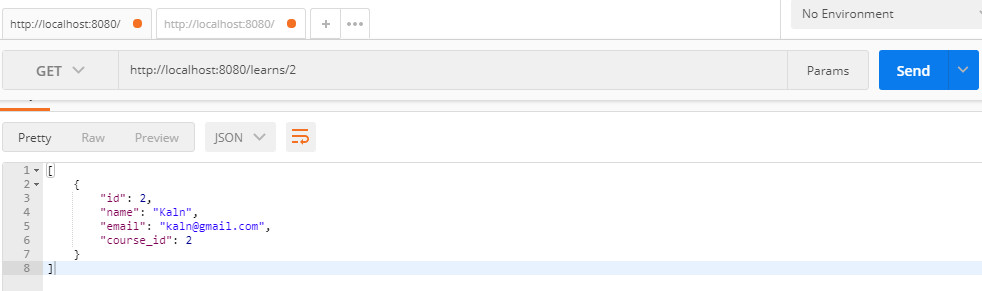
 

method-get-detail-nodejs-simple-crud-apis-with-mysql

Method Get, get detail on Postman


3.3. Update data with method PUT route

// Put route value get from params
app.put(‘/learns/:id’, urlencodedParser, (req, res) => {
let id = req.params.id;

let name = req.body.name;
let email = req.body.email;
let course_id = req.body.course_id;

let sql = “UPDATE node_mysql_simple SET name = ?, email = ?, course_id = ? WHERE id = ?”;
mysqlConnection.query(sql, [name, email, course_id, id], (err, rows, fields) => {
if (!err) {
res.send(‘Updated with ID : ‘+ id);
} else {
console.log(err);
}
})
});


method-update-nodejs-simple-crud-apis-with-mysql

Method Update


3.4. Delete data with method Delete

// Route Delete
app.delete(‘/learns/:id’, (req, res) => {
mysqlConnection.query(‘DELETE FROM node_mysql_simple WHERE id = ?’, [req.params.id], (err, rows, fields) => {
if (!err) {
res.send(‘Delete success ID: ‘ + req.params.id);
} else {
console.log(‘Delete error: ‘ + err);
}
})
});


method-delete-nodejs-simple-crud-apis-with-mysql

Method Delete


– Maybe you are interested: PHP – MVC CRUD and Connect to MySQL using PDO


Thank for reading.

Thứ Ba, 21 tháng 9, 2021

PHP – MVC CRUD and Connect to MySQL using PDO

 Basic knowledge is always very important, in this article I will introduce to you how to use the PHP – MVC model, using PDO to connect to MySQL.

What is PDO? 

It is an acronym for “PHP Data Objects”. Until now, the functions used were divided according to the type of database.

For example:

– When connecting to MySQL, I used to connect with the “mysql_connect” function,
– In the case of PostgreSQL, it was connected with the “pg_connect” function.

There is no problem if the database is fixed, but if you change or port to a different database in the future, you have to rewrite everything.

But if you use the PDO class, the same function can be used regardless of which database is used, so if you change the database in the future, you only need to change the parameters you specified when you created the PDO class (it seems that there are some differences depending on the database…)

Let’s learn how to connect to a database using the PDO class in this article.

We will proceed on the premise of the following conditions:

* PHP is PHP 5.3.6 or higher
* Database is MySQL
* Character encoding is UTF-8


I. Connect to DB with PDO

I assume for example you have a DB with the following information:

Name: YOUR_DB_NAME,
Username: root
Password: 123456
Port: 3306
Table: users (id, first_name, last_name, age)


Create a Class DB and use PDO to connect to your Database as follows. Specifies the character encoding. Note that it is utf8, not UTF-8

Create the connection.php file on your root directory:

connection.php

class DB
{
/**
* Static variable DB Name
*/
public function config()
{
return [
‘db_name’ => ‘YOUR_DB_NAME’,
];
}

/**
* Connect to Database
*/
public static function getInstance()
{
$db = new DB();
$db_name = $db->config()[‘db_name’];

try {
$pdo = new PDO(‘mysql:host=localhost; port=3306; dbname=’ . $db_name, ‘root’, ‘123456’);
$pdo->exec(“SET NAMES ‘utf8′”);
} catch (PDOException $ex) {
$pdo = $ex->getMessage();
}

return $pdo;
}
}

Using the above PDO statement, we were able to connect to the DB successfully.

When executing SQL statements with PDO, the following two types of methods can be used.
– query
– prepare

Next, let’s take a closer look at each method.

In addition, we create Controller, Model, View in turn to get data through PDO

II. Controller, Model, View

1. Create the IndexController.php on /root/controllers folder

controllers/UsersController.php

require_once (‘controllers/BaseController.php’);
require_once (‘models/user.php’);

class UsersController extends BaseController
{
/**
* Construct
*/
public function __construct()
{
$this->folder = ‘users’;

// Call perpage of pagination setting
$this->status_success = 1;
$this->status_error = 0;
$this->per_page = 10;

$this->save_success = ‘Data has been saved successfuly’;
$this->save_error = ‘Data has been saved failed’;
$this->delete_success = ‘Data has been deleted successfuly’;
$this->delete_error = Data has been deleted failed;
}

/**
* Index
*/
public function index()
{
// Set default perpage
$per_page = $this->per_page

[$users, $pagination, $page_total] = User::all($per_page);

$data = [‘users’ => $users, ‘pagination’ => $pagination, ‘per_page’ => $per_page, ‘page_total’ => $page_total];

$this->render(‘index’, $data);
}
}


2. Create the BaseController.php on /root/controllers folder

controllers/BaseController.php

/**
* Base Controller
*/
class BaseController
{
// variable folder name in to access views folder
protected $folder;

/**
* Show result to views
*/
function render($file, $data = array()) {
// Check exist current file
$view_file = ‘views/’ . $this->folder . ‘/’ . $file . ‘.php’;

if (is_file($view_file)) {
// if exist file, create variable and add to call function
extract($data);

// Save data and show with variable to views
ob_start();
require_once($view_file);
$content = ob_get_clean();

// use common template
require_once(‘views/layouts.php’);
} else {
// if file not exist, show error page
header(‘Location: index.php?controller=pages&action=error’);
}
}
}


3. Next, create the file user.php in /root/models folder

models/user.php

/**
* User Model
*/
Class User
{
/**
* List all
*/
public function all($per_page)
{
$db = DB::getInstance();
if (isset($_GET[‘page’])) {
$page = (int)$_GET[‘page’];
} else {
$page = 1;
}

if ($page > 1) {
$start = ($page * $per_page) – $per_page;
} else {
$start = 0;
}

// query get pagination, page_total
$page_num = $db->prepare(“SELECT count(*) FROM users WHERE ‘last_name’ = ? AND age = ?”);
$page_num->execute();
$page_total = $page_num->fetchColumn();
$pagination = ceil($page_total / $per_page);

// query get list data
// your query is select all of them (SELECT * FROM users LIMIT {$start}, $per_page)
// or add conditions with last_name and age value

$last_name = ‘John’;
$age = 20;
$request = $db->prepare(“SELECT * FROM users WHERE ‘last_name’ = ? AND age = ? LIMIT {$start}, $per_page “);

$lists = [];
if ($request->execute([$last_name, $age]) {
foreach ($request->fetchAll() as $item) {
$list = [];
$list[‘first_name’] = $item[‘first_name’];
$list[‘last_name’] = $item[‘last_name’];
$list[‘age’] = $item[‘age’];

$lists[] = $list;
}
}

return [$lists, $pagination, $page_total];
}
}


米 Note: Select method with PDO, you can use one of the two methods below. In the example above I used method 1 for the shorter code

// Pattern 1
$request = $db->prepare(“SELECT * FROM users WHERE ‘last_name’ = ? AND age = ?”);
$request->execute([‘John’, 20]);

// Pattern 2
$request = $dbh->prepare(“SELECT * FROM users WHERE last_name = :last_name AND age = :age”);
$request->bindValue(‘:last_name’, ‘John’);
$request->bindValue(‘:age’, 20, PDO::PARAM_INT);
$request->execute();

4. Next, create the view file in /root/views/users folder
views/users/index.php

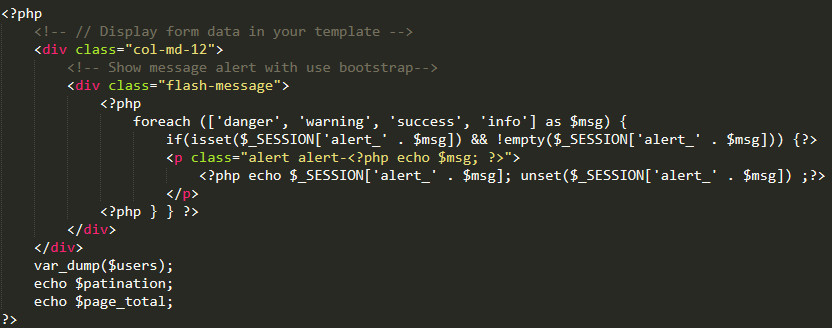
    // Display form data in your template
var_dump($users);
echo $patination;
echo $page_total;
?>


5. Create the template layout file in /root/views folder
views/layouts.php

This is very simple layout


6. Finally, we create the index.php and routes.php file in the root directory. Router file to do the navigation.

– index.php

    require_once(‘connection.php’);

if (isset($_GET[‘controller’])) {
$controller = $_GET[‘controller’];
if (isset($_GET[‘action’])) {
$action = $_GET[‘action’];
} else {
$action = ‘index’;
}
} else {
$controller = ‘pages’;
$action = ‘home’;
}

require_once(‘routes.php’);
?>


– routes.php


$controllers = array(
‘users’ => [‘index’, ‘create’, ‘edit’, ‘store’, ‘update’, ‘delete’],
);

if (!array_key_exists($controller, $controllers) || !in_array($action, $controllers[$controller])) {
$controller = ‘pages’;
$action = ‘error’;
}

if (strpos($controller, ‘users’) !== false) {
include_once(‘controllers/’ . $controller . ‘Controller.php’);
}

$class = str_replace(‘_’, ”, ucwords($controller)) . ‘Controller’;
$controller = new $class;
$controller->$action();
?>

So we have completed the basic PHP-MVC model, with the Data Select query using PDO. Next we will implement the insert, update, and delete models. The content will edit into the files we created above.


7. Edit UsersController

In the UsersController.php, add function create, edit, store, update and delete

controllers/UsersController.php

require_once (‘controllers/BaseController.php’);
require_once (‘models/user.php’);

class UsersController extends BaseController
{
/**
* Create view
*/
public function create()
{
// It return add view in views/users/create.php
$this->render(‘add’);
}

/**
* Store Action
*/
public function store()
{
$result = User::store();

if ($result == $this->status_success) {
$_SESSION[‘alert_success’] = $this->save_success;
echo ”;
} else {
$_SESSION[‘alert_danger’] = $this->save_error;
echo ”;
}
}

/**
* Edit view
*/
public function edit()
{
// It return add view in views/users/edit.php
$user = User::find($id);
$data = [‘user’ => $user];
$this->render(‘edit’, $data);
}

/**
* Update Action
*/
public function update()
{
$result = User::update();

if ($result == $this->status_success) {
$_SESSION[‘alert_success’] = $this->save_success;
echo ”;
} else {
$_SESSION[‘alert_danger’] = $this->save_error;
echo ”;
}
}

/**
* Delete Action
*/
public function delete()
{
$result = User::delete();

if ($result == $this->status_success) {
$_SESSION[‘alert_success’] = $this->delete_success;
echo ”;
} else {
$_SESSION[‘alert_danger’] = $this->delete_error;
echo ”;
}
}
}


8. In the model file models/user.php, add function find, store, update, delete

models/user.php

/**
* Find
*/
public function find(int $id)
{
$db = DB::getInstance();
$sql = $db->prepare(“SELECT * FROM users WHERE id = ? “);
$sql->execute([$id]);
$list = [];
if ($item = $sql->fetch()) {
// code …
}

return $list;
}

/**
* Store Action
*/
public function store()
{
try {
$db = DB::getInstance();
// insert to users table
$sql = “INSERT INTO users (first_name, last_name, age) VALUES (?, ?, ?)”;
$row = $db->prepare($sql);

if ($row->execute([$first_name, $last_name, $age])) {
$result = 1; // successful
} else {
$result = 0; // failed
}
} catch (PDOException $ex) {
$result = $ex->getMessage();
}
return $result;
}

/**
* Update Action
*/
public function update()
{
try {
$db = DB::getInstance();
// update to users table
$sql = “UPDATE users SET first_name = ?, last_name = ?, age = ? WHERE id = ?”;
$row = $db->prepare($sql);

if ($row->execute([$first_name, $last_name, $age, $id])) {
$result = 1; // successful
} else {
$result = 0; // failed
}
} catch (PDOException $ex) {
$result = $ex->getMessage();
}
return $result;
}

/**
* Delete Action
*/
public function delete(int $id)
{
try {
$db = DB::getInstance();
// delete to users table
$sql = “DELETE FROM users WHERE id = ?”;
$row = $db->prepare($sql);

if ($row->execute([$id])) {
$result = 1; // successful
} else {
$result = 0; // failed
}
} catch (PDOException $ex) {
$result = $ex->getMessage();
}
return $result;

}


9. In the views/users/ folder 

Create create.php, edit.php and edit index.php

– create.php and edit.php, simple code is below

// Open form

form id=”frmAction” method=”post” action=”index.php?controller=users&action=store” enctype=”multipart/form-data”>

// Input element

// Close form


– index.php


III. Conclusion

Our MVC code looks like this:

– controllers
+ UsersController.php
– models
+ user.php
– views
+ users/create.php
+ users/edit.php
+ users/index.php
+ layouts.php
– connection.php
– routes.php


Above is a simple PHP-MVC example, using PDO to manipulate MySQL, PDO also helps you avoid some SQL injection errors. So if you’re not using any PHP framework then giving PDO a try is a great option.

Thank you very much for reading this post.

Tags: , , , ,